When running an experiment, it is desirable to synchronize the start of a trial with the start of an fMRI scan. The interval between scans is known as the TR, or Repetition Time. When designing an experiment, a difficulty arises when the fMRI scanner is configured to send a trigger not only at the start of a scan, but also for slices during the interval.
The feature required to enable filtering out the slice triggers was added in Lumina firmware version 2.2.7, dated September 2021. Please update your controller’s firmware if running an earlier version. You can use Xidon to determine the firmware version.
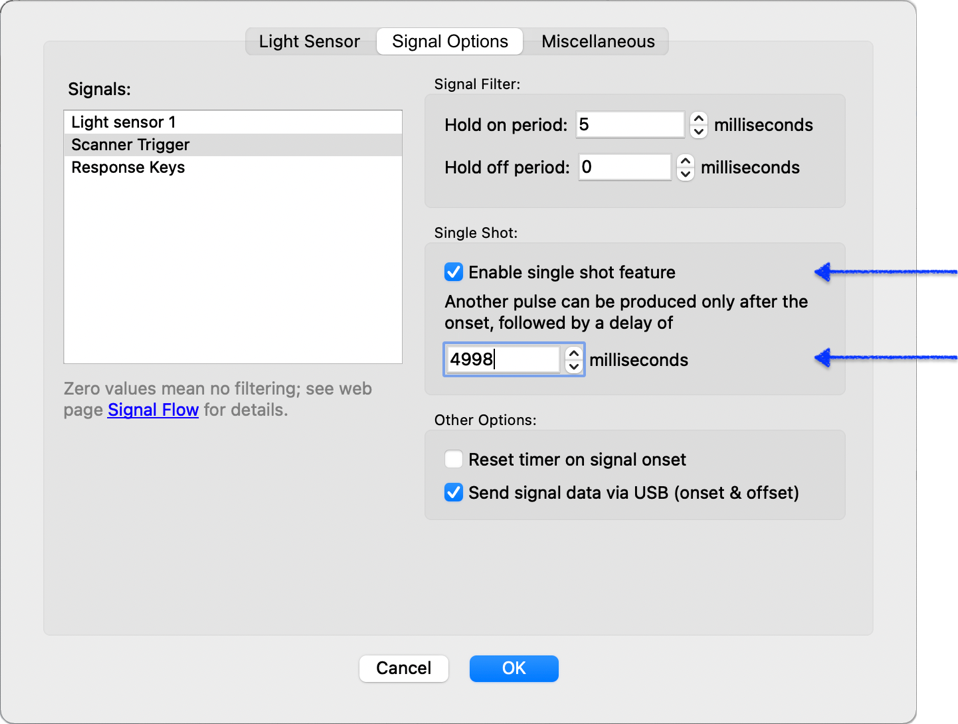
On either Mac or Windows, after you download Xidon and run it:
If your scanner’s TR has a lot of jitter, you would need to reduce the value you enter by more than 1 or 2 milliseconds.
The single shot settings above affect the USB output and m-pod output, but not the Scanner Trigger LED on the Lumina controller. This is by design, for a couple of reasons. The LED is meant to help the user verify that the physical connection between the controller and the MRI scanner is established, and for this reason, its behavior is not affected by any of the signal options.
Last revision: September 1, 2021
PRODUCTS
SUPPORT
STAY IN TOUCH


© Copyright 2026 Cedrus Corporation, P.O. Box 6309, San Pedro, CA 90734 - USA
Phone: +1-310-548-9595. Send us an email
qwerasdf