Cedrus logo

Support Arrow Forward  Riponda Arrow Forward  Fixing a Response Pad’s Configuration

‍In the final stage of producing a response pad, the assemblers run a utility program called Xidon (pronounced Zydon) that tells the response pad which particular model it is, e.g. a Model C or a Model L. This information is lost after a firmware update. And sometimes the assemblers make a mistake. This page shows how to fix a misconfiguration.

‍Determining If Your Response Pad is Misconfigured

‍The easiest way is to use the same free Xidon software:

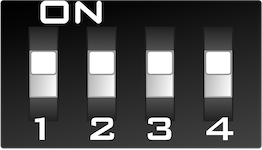
  • The response pad has four switches on the back called DIP switches. They should all be in the down position. If they are not, make sure that the response pad is not connected to the computer, bring them all to the down position, then connect the response pad to the computer.
  • Download Download Xidon for either Mac or Windows.
  • Run it.
  • In Xidon, click on the Search for Device button. 
  • Xidon will scan all USB ports. When it finds your response pad, it will display its model name and picture in the sidebar.

‍Fixing a Misconfigured Response Pad

‍If the displayed name and picture do not match the response model that you have, you can change that:

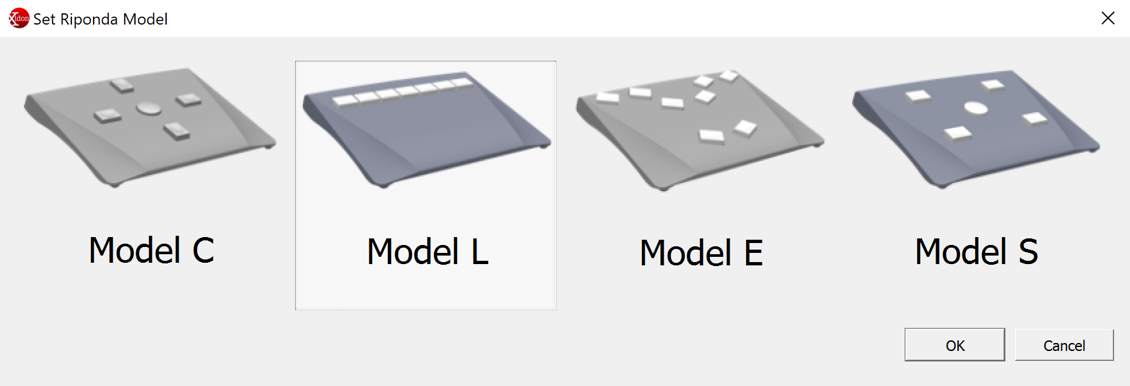
  • Click on the Device menu and choose Set Model…. A dialog appears.
  • Select the model that you have and click on OK.

‍The model setting will be stored in flash memory.


Arrow Back Back to Riponda Support main page
Last Revision: Jan 19, 2023

PRODUCTS

SUPPORT

STAY IN TOUCH

© Copyright 2026 Cedrus Corporation, P.O. Box 6309, San Pedro, CA 90734 - USA

Phone: +1-310-548-9595. Send us an email Envelope. See privacy policy.

qwerasdf