Using your Riponda response pad in Standard mode requires that a USB driver be installed. Connecting it is straightforward. Only the USB cable (included) is needed. No separate power supply is necessary.
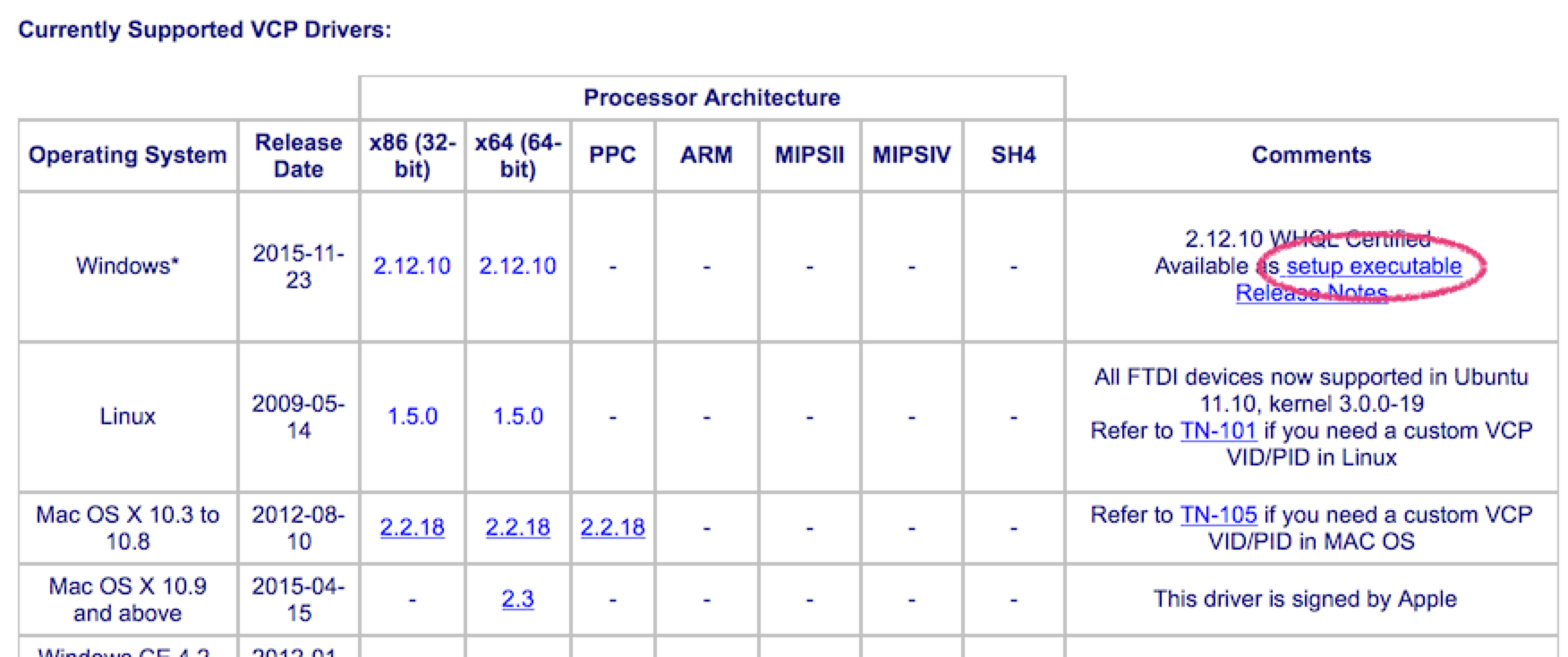
When you connect the response pad to your PC’s USB port, Windows will automatically prompt you to have the USB driver installed – in most cases. In the few instances that it does not, visit this web page. Scroll down a little, you will see a table of available USB drivers. In the Comments column, click on the link “setup executable”:
The “setup executable” link is more convenient than the drivers listed in the “x86” and “x64” columns because, when the program runs, it automatically places the USB driver files in the correct location.
Depending on your computer’s settings, you will likely need administrator privileges to perform this one-time installation.
Last Revision: Jan 19, 2023
PRODUCTS
SUPPORT
STAY IN TOUCH


© Copyright 2026 Cedrus Corporation, P.O. Box 6309, San Pedro, CA 90734 - USA
Phone: +1-310-548-9595. Send us an email
qwerasdf