See this blog post for very important timing considerations — regardless of which version of Net Station you are using.

Cedrus manufactures a StimTracker signal adapter board that makes it possible to interface with EGI’s Net Amps EEG amplifiers. The signal adapter comes with a DB9 cable:
Setting up Net Station to work with StimTracker is straightforward. The screen snapshots below were taken using Net Station 4.5.5.
1.
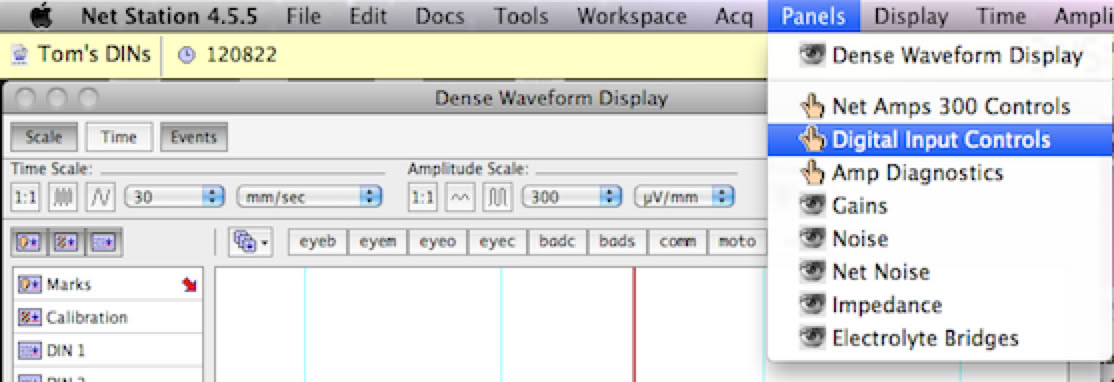
Click on the Panels menu and choose Digital Input Controls.
2.
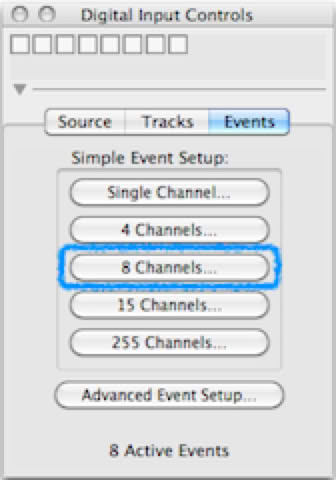
In the “Digital Input Controls” window that appears, click on the 8 Channels… button. Another window appears.
3.
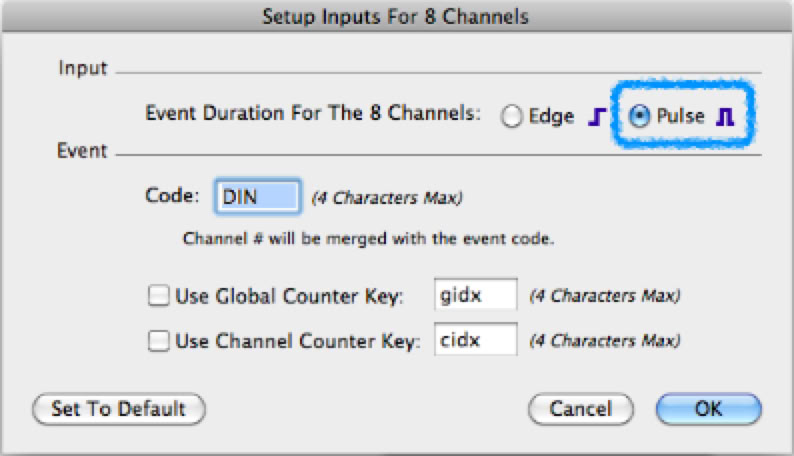
In the “Setup Inputs for 8 Channels” window, select the Pulse radio button (highlighted).
4.
Click on OK to close the window.
You are now ready to acquire data. DINs will then appear and be recorded with a duration that corresponds to the duration of the detected stimulus, participant response, or event code sent from the stimulus presentation computer.
The trigger value is as seen in the Net Station software. See also the note in Using StimTracker about the rate at which the LEDs flash in StimTracker’s front panel.
StimTracker Signal
Trigger Value
Comments
Light sensor 1
0
Light sensor 2
1
TTL input
2
StimTracker will send output to channel 3 when it detects input on any of the six TTL/digital input lines.
Audio L+R
3
StimTracker will send output to channel 4 when the volume rises above the preset threshold on either the left audio channel or the right audio channel.
Microphone
4
Event marker bit 0
5
Event marker bit 1
6
Event marker bit 2
7
Last Revision: June 13, 2022
PRODUCTS
SUPPORT
STAY IN TOUCH


© Copyright 2026 Cedrus Corporation, P.O. Box 6309, San Pedro, CA 90734 - USA
Phone: +1-310-548-9595. Send us an email
qwerasdf